Collect Payments Directly Inside Zoho Books With Tap Payments
The new Tap Payments plugin for Zoho Books lets businesses collect payments directly from invoices while keeping accounting records in sync automatically.

Zoho Books is widely used across MENA to manage invoicing and accounting. Yet many businesses still collect payments outside the system, then update records manually and reconcile later.
The Tap Payments plugin brings payment collection directly into Zoho Books. Invoices, payment status, and records stay in sync automatically so teams collect faster, reduce errors, and see cash flow in real time.
How disconnected systems slow growth
Many small and mid-sized businesses still run payments and accounting separately:
- An invoice is created in Zoho Books.
- The customer pays through a different tool.
- A team member updates records manually.
- Follow-ups happen across email, WhatsApp, or spreadsheets.
This setup creates predictable problems:
- Manual entry wastes time: Teams spend hours copying data between systems.
- Errors that delay reconciliation: One missing receipt or wrong number delays reconciliation and skews reports.
- Cash flow lacks visibility: Paid, pending, and overdue invoices aren’t clear in real time.
- Customers face friction: Extra steps or missing local payment methods increase drop-offs.
Finance teams need a simpler setup, one that improves the customer experience and reconciliation at the same time.
Why integrated payments matter now
As finance teams take on more responsibility for cash flow, reporting, and compliance, disconnected systems become a bottleneck. Manual reconciliation slows closing cycles, hides payment issues, and increases operational risk.
Integrated payments remove those gaps by keeping data accurate at the source. With Tap Payments built into Zoho Books, payments and accounting operate as one system instead of two disconnected tools.
One Connected Flow from Invoice to Payment
Tap Payments Plugins for Zoho Books connects invoices and payments inside Zoho Books into a single workflow. An invoice is created, the customer pays through a secure link using trusted methods like mada, KNET, Apple Pay, Visa, Mastercard, or BNPL, and the payment syncs automatically.
There’s no manual updating, no reconciliation delays, and no duplicate entry. Payments post instantly, collections move faster, and financial data stays accurate in real time.
What this means for your finance team
Businesses that switch to integrated payments see improvements quickly.
- Faster collections: Customers pay instantly from the invoice, leading to fewer overdue balances and stronger cash flow.
- Accurate reporting in real time: Every payment updates automatically inside Zoho Books, giving finance teams an up to date view of revenue and outstanding invoices.
- More efficient operations: Teams spend less time entering payment data or chasing unpaid invoices, freeing them to focus on planning and analysis.
- Better customer experience: Customers pay using familiar local methods without extra steps. A simple experience means fewer drop offs and smoother collections.
Built for how businesses operate across MENA
Tap Payments brings local expertise and full payment coverage across the region.
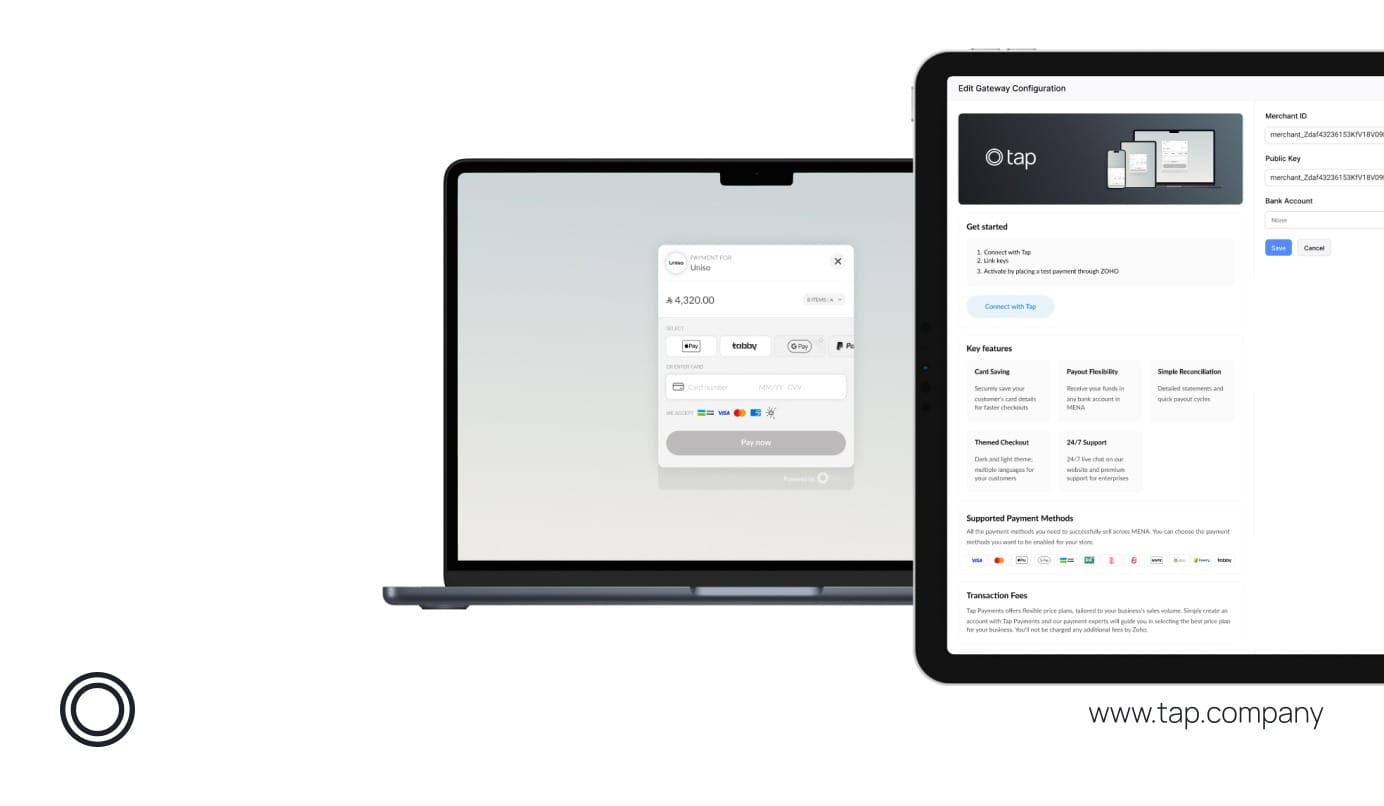
- Accept all major MENA payment methods: Support cards, Apple Pay, mada, KNET, BNPL, and more from one checkout page.
- Accept and settle in multiple currencies: Tap supports SAR, AED, BHD, EGP, JOD, KWD, OMR, USD, GBP, and EUR with real time currency conversion at checkout.
- Get paid into any local bank account: Tap facilitates payouts to all local banks across MENA. Connect your preferred bank and receive payouts quickly.
- Support device and wallet payments: Offer mobile wallets, cards, and express checkout flows from the same unified interface.
- Apple Pay support across all browsers: Faster authentication, higher conversion, and stronger customer trust.
- Multi language checkout: Switch between English and Arabic with accurate right to left formatting.
- Custom themes and modes: Offer light mode, dark mode, or monochrome styles for a consistent brand experience.
Reconciliation made simple
Stay in control with clear transaction statements and automated reporting.
Tap Payments provides:
- Automated reconciliation.
- Clean transaction summaries.
- Faster month end closing.
- Settlement cycles built for growing MENA businesses.
Your finance team always knows what has been paid, what is pending, and what has settled.
Quick setup inside Zoho Books
- Install
Install the Tap Payments app inside Zoho Marketplace. - Set up your Tap account
Create or connect your Tap account and choose your preferred payment methods. - Go live
Send a test invoice, confirm payment, and start collecting real payments instantly. No coding required.
Local support when you need it
Businesses get access to Tap’s dedicated support team across the region. Our specialists understand local payment rules and customer expectations, helping you resolve issues quickly and keep your financial operations running smoothly.
Ready to explore the integration?
If you use Zoho Books and want payments and accounting to work as one, Tap Payments lets you start collecting online payments directly from your invoices in minutes.
- Visit the Tap Payments listing on Zoho Marketplace.
- Explore the setup guide.
- Start sending invoices with online payment links from Zoho Books.
Not using Tap Payments yet?
Talk to our team about enabling local MENA payment methods inside Zoho Books.
Merchant Questions
Q1: How does the Tap Payments plugin work inside Zoho Books?
A: The Tap Payments plugin allows customers to pay directly from Zoho Books invoices using a secure payment link. Once payment is completed, the invoice status and accounting records update automatically inside Zoho Books, with no manual reconciliation or data entry required.
Q2: Which payment methods are supported through Tap Payments in Zoho Books?
A: Tap Payments supports major local and global payment methods across MENA, including cards, Apple Pay, mada, KNET, BNPL options, and more. Customers can choose their preferred method from a single, unified checkout experience.
Q3: Do finance teams need technical or development support to get started?
A: No. The Tap Payments plugin can be installed directly from the Zoho Marketplace and set up in minutes. Finance teams can send a test invoice and start collecting real payments without any coding or technical integration work.